
In this tutorial we’ll teach you how to make a copy of your Tumblr blog onto WordPress.com to act as a backup.
The first two steps don’t need to be followed if you already use WordPress.com.
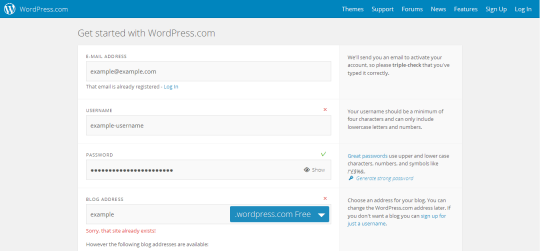
1. Sign up for a WordPress.com account
You need a WordPress.com blog, simply follow the steps to select your username and confirm your account via email.
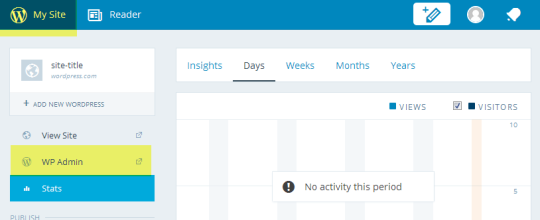
2. Open WordPress Admin
- Click on My Site
- Select the WP Admin you wish to import into
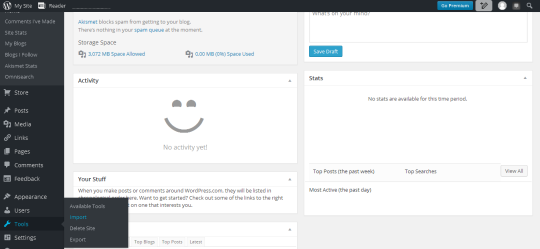
3. Visit the import tools page
In the sidebar menu select ‘tools’ and then ‘import’.
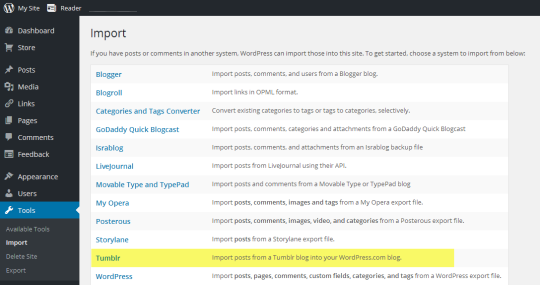
4. Select import from Tumblr
5. Allow Tumblr access
Click the ‘Connect to Tumblr to begin’ button. You may need to log into Tumblr if you haven’t already. Be sure to allow access to WordPress.com
6. Start the import!
Once authenticated you can select your Tumblr blog from the list of your blogs and click on ‘Import this blog’.
And you’re done, WordPress.com takes care of the rest and will create a copy of your posts onto your WordPress.com blog.
Tag: tumblr


Why is Tumblr suddenly making me “follow” things I comment on or reblog???
They tried this before, turned it off when it was annoying the heck out of people, and sneakily just brought it back. Here’s how to turn it off on each post.
Thank You!!!
 Karate, SPN Demonic Octopus Guardian